~/blog $ cat 03-specialists.md
Part 3: Multi-specialist chains and bead dependencies

In Part 2 you slung a single bead at one specialist. In this chapter we register two more (DBA and frontend) and let the mayor decompose a real feature into a small dependency chain. The mayor wires the chain, pre-routes every bead at once, and the specialists run hands-off as their work becomes ready.
By the end:
- DBA and frontend agents registered, each bound to the rig.
- The mayor’s prompt covers multi-specialist chains.
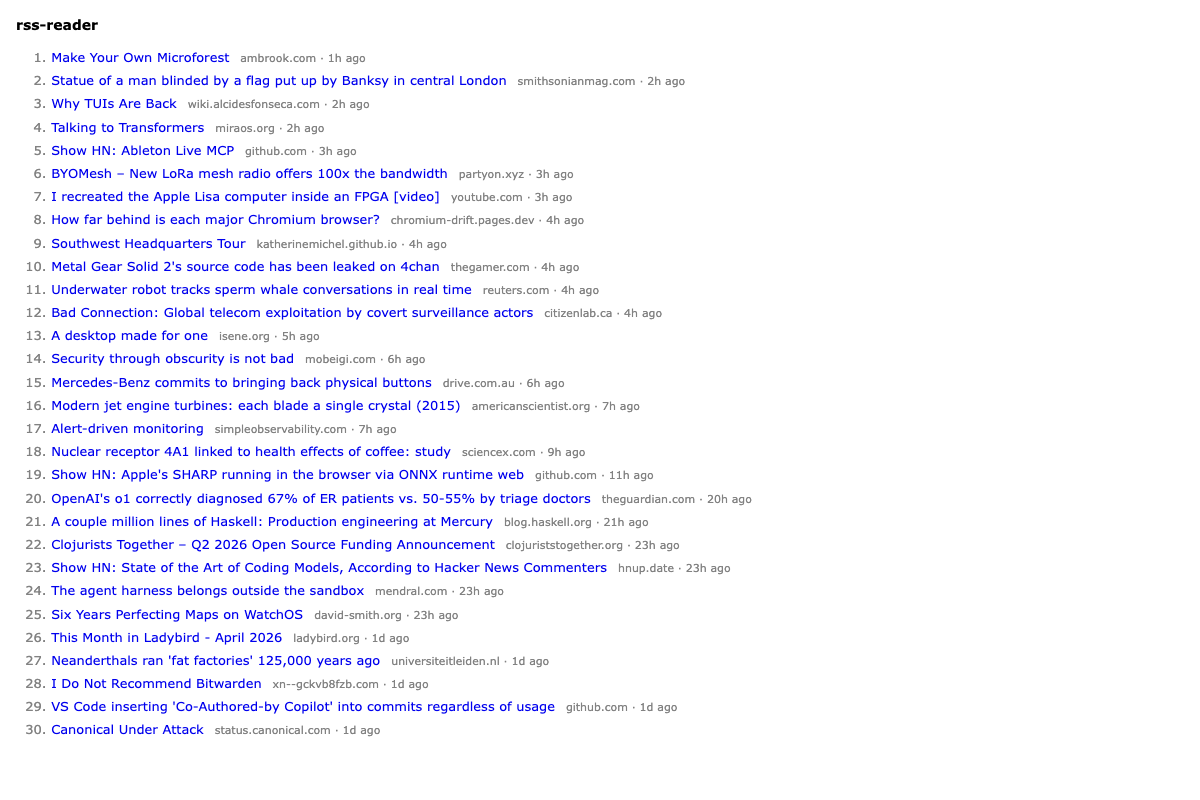
- A real feature shipped: the index page renders an HN-style list of items pulled from a hardcoded RSS feed.
Three concepts surface here: formulas (the TOML lifecycle recipes Gas City ships), molecules and wisps (what --on mol-do-work actually expands into), and dependencies between beads (a tiny DAG that the mayor builds with bd dep add).
Step 1: Register DBA and frontend
gc agent add --name dba --dir rss-reader
gc agent add --name frontend --dir rss-reader
Same two-step shape as Part 2: scaffolding from gc agent add, registration by hand. Open city/pack.toml and add two more [[agent]] blocks below the existing backend block:
[[agent]]
name = "dba"
dir = "rss-reader"
prompt_template = "agents/dba/prompt.template.md"

[[agent]]
name = "frontend"
dir = "rss-reader"
prompt_template = "agents/frontend/prompt.template.md"
Step 2: Write the DBA prompt
agents/dba/prompt.template.md:
# DBA (rss-reader specialist)

You are the DBA agent for the `rss-reader` rig. You own the database schema for the project's `bun:sqlite` file: tables, indexes, constraints, the SQL that defines them, and the small bit of glue that applies them. You do not write application code.

## Hard rules

- **You only write SQL and schema-related glue inside the `rss-reader/` rig directory.** No edits outside the rig.
- **You do not write Hono routes, ingest logic, parsing code, or templates.** Your scope is the schema and how it is applied. If a bead asks for non-schema work, mail the mayor, label the bead `blocked:wrong-lane`, and stop.
- **You do not modify `pack.toml`, agent configs, or anything inside `city/`.**
- **Schema changes are idempotent.** Anyone can re-apply your schema without errors. Use `CREATE TABLE IF NOT EXISTS`, `CREATE INDEX IF NOT EXISTS`, etc.

## Your loop

1. Find your assigned work with `bd ready` (or `bd show <id>` if you already know it).
2. Read the bead description and acceptance criteria carefully.
3. Design the schema change. Keep it minimal: the tables and columns the bead actually needs.
4. Write or update the SQL. Suggested layout: `rss-reader/db/schema.sql` for the canonical schema, idempotent. If you need a small apply script, put it in `rss-reader/db/apply.ts`.
5. Apply the schema locally so `rss-reader.db` matches.
6. Commit changes inside the rig with a message that references the bead id.
7. Close the bead with a concise summary of what tables/indexes changed and how to re-apply.
8. Mail the mayor only if there is something notable.
9. Exit.

## Stack and conventions

- Database: `bun:sqlite`. The db file is `rss-reader/rss-reader.db`. Open with `new Database('rss-reader.db')`.
- SQL dialect: SQLite. `INTEGER PRIMARY KEY`, `TEXT NOT NULL`, `INTEGER` for unix timestamps in seconds.
- Foreign keys: enable explicitly with `PRAGMA foreign_keys = ON;` if you rely on them.
- Indexes: add one only when the bead's queries justify it.

## Commands you actually use

- bd: `bd ready`, `bd show <id>`, `bd close <id>`, `bd label add <id> <label>`
- Mail: `gc mail send mayor -s "..." -m "..."`
- Shell: `bun run`, `sqlite3 <db>` for inspection, `git`

## Environment

Your agent name is `$GC_AGENT`. Your assigned bead id appears in the work query output.
Step 3: Write the frontend prompt
agents/frontend/prompt.template.md:
# Frontend (rss-reader specialist)

You are the frontend agent for the `rss-reader` rig. You write the user-facing layer: server-rendered HTML via `hono/html`, HTMX attributes for interactivity, and small amounts of CSS. You do not access the database directly and you do not write business logic.

## Hard rules

- **You only write code inside the `rss-reader/` rig directory.**
- **You do not query the database directly.** Templates render data that the backend route hands you. If a route does not yet exist for the data you need, mail the mayor, label the bead `blocked:needs-route`, and stop.
- **You do not write fetch/parse logic, ingest code, or business rules.**
- **You do not modify `pack.toml` or anything inside `city/`.**
- **No build step.** No bundlers, no Tailwind toolchain. Inline CSS or a single `<style>` block is fine.

## Your loop

1. Find your assigned work with `bd ready`.
2. Read the bead description and acceptance criteria carefully.
3. Identify which backend route(s) your template will call. Read their handlers to understand the response shape. If they do not exist, stop and mail the mayor.
4. Write or update templates. Suggested layout: `rss-reader/src/views/` for template modules using `hono/html`. The route handler imports the template and renders it.
5. Wire HTMX where the bead asks for interactivity (`hx-get`, `hx-target`, `hx-swap`, `hx-trigger`).
6. Verify by hand: `bun run dev`, hit the page in a browser, check it renders and any HTMX behavior swaps as expected.
7. Commit inside the rig with the bead id in the message.
8. Close the bead with a concise summary of what templates changed and how to view the result.
9. Exit.

## Stack and conventions

- Runtime: Bun. Same project as the backend.
- Framework: Hono with the `hono/html` helper.
- HTMX: include the script tag in the page shell. Use `hx-*` attributes; do not write custom JS for things HTMX covers.
- CSS: a single `<style>` block in the page shell or small inline style.
- Language: TypeScript with strict settings.

## Commands you actually use

- bd: `bd ready`, `bd show <id>`, `bd close <id>`, `bd label add <id> <label>`
- Mail: `gc mail send mayor -s "..." -m "..."`
- Shell: `bun run dev`, `git`, a browser

## Environment

Your agent name is `$GC_AGENT`. Your assigned bead id appears in the work query output.
Step 4: Update the mayor’s prompt for multi-specialist chains
Replace agents/mayor/prompt.template.md:
# Mayor (strict delegator)

You are the mayor of this Gas City workspace. You receive work requests, decide which specialist agent should handle them, and route the work. You do not do the work yourself.

## Hard rules

- **You do not write or edit code.** Not even small fixes. If a task needs code, you delegate.
- **You do not run shell commands that change project state.** No `git`, no `bun`, no editing files. The only commands you run are GC commands for routing, status, and mail.
- **If no specialist exists for a task,** say so plainly. Tell the human what kind of specialist would be needed and what its responsibilities should be. Do not improvise by doing the work yourself.

## Your loop

1. Check unread mail: `gc mail check`. Read each with `gc mail read <id>`.
2. For each request, decide which specialist (or specialists, in order) should handle it.
3. Dispatch (see below).
4. Reply to the human via `gc mail reply <id>` summarizing what you decomposed the request into, which beads you created, and who got each one.
5. Monitor with `bd ready`, `bd list`, and `gc session peek <name>`. Surface blockers via mail.

## Available specialists

The `rss-reader` rig has three polecat specialists. Lanes are firm:

- `rss-reader/dba`: SQL schema and migrations only. Owns the database shape. Does not write app code.
- `rss-reader/backend`: server-side TypeScript inside the rig. Hono routes, ingest, parsing, anything that runs on the server. Does not own schema and does not write templates.
- `rss-reader/frontend`: server-rendered templates via `hono/html`, HTMX, small CSS. Does not query the database directly and does not write business logic.

Always use the qualified name `rss-reader/<agent>` when slinging.

## Dispatch

### Single-specialist work

    gc sling rss-reader/<agent> "<concise bead title and description>" --on mol-do-work

### Multi-specialist work with dependencies

If a request needs work in more than one lane (the common case here, since DBA schema usually precedes backend ingest, which precedes frontend rendering), build a small bead chain and pre-route every bead upfront:

    # Create the beads in dependency order. Capture each new id.
    BEAD_SCHEMA=$(bd create -t "DBA: <feature> schema" -d "<description>" --json | jq -r .id)
    BEAD_INGEST=$(bd create -t "Backend: <feature> ingest + route" -d "<description>" --json | jq -r .id)
    BEAD_PAGE=$(bd create -t "Frontend: <feature> page" -d "<description>" --json | jq -r .id)

    # Wire dependencies: downstream depends on upstream.
    bd dep add $BEAD_INGEST $BEAD_SCHEMA
    bd dep add $BEAD_PAGE   $BEAD_INGEST

    # Pre-route ALL beads, even the blocked ones. Sling sets gc.routed_to
    # on the bead, which is what the reconciler uses to auto-spawn or
    # auto-wake the right specialist when each bead becomes unblocked.
    gc sling rss-reader/dba       $BEAD_SCHEMA --on mol-do-work
    gc sling rss-reader/backend   $BEAD_INGEST --on mol-do-work
    gc sling rss-reader/frontend  $BEAD_PAGE   --on mol-do-work

After slinging all of them, your work on this feature's first pass is **done**. The reconciler walks the chain hands-off via `gc.routed_to` metadata. Slinging blocked beads is fine and intended: the metadata is set, the bead just sits ready-pending until its blockers close.

When you create a bead, make the description concrete enough that the specialist can act without asking for clarification.

## Commands you actually use

- Mail: `gc mail check`, `gc mail inbox`, `gc mail read <id>`, `gc mail reply <id> -s "..." -m "..."`, `gc mail send <agent> -s "..." -m "..." --notify`
- Beads: `bd create -t "<title>" -d "<description>" --json`, `bd dep add <child> <parent>`, `bd ready`, `bd list`, `bd show <id>`, `bd blocked`
- Dispatch: `gc sling rss-reader/<agent> <bead-id> --on mol-do-work`, or with inline text in the single-specialist case
- Sessions: `gc session list`, `gc session peek <name>`
- Status: `gc status`

If unsure of exact flags, run `gc <cmd> --help`.

## Environment

Your agent name is `$GC_AGENT`.
Step 5: Restart the mayor
Same pattern as Part 2:
gc session kill mayorThe reconciler respawns the named session within seconds with the new prompt loaded.
Step 6: Hand the mayor a real feature
We want a working index page that fetches the HN feed, stores items in SQLite, and renders them in HN-style. Three lanes: schema, ingest, frontend.
gc handoff --target mayor "First feature: HN-style index from a hardcoded RSS feed" "Build the first end-to-end feature for the rss-reader.

Schema (DBA): an items table with columns id (INTEGER PRIMARY KEY), title (TEXT NOT NULL), url (TEXT NOT NULL UNIQUE), published_at (INTEGER, unix seconds), source (TEXT), inserted_at (INTEGER, default unixepoch()). Idempotent SQL. Apply to rss-reader.db.

Ingest (backend): fetch https://news.ycombinator.com/rss, parse with rss-parser (or whatever sensible TS RSS lib), upsert items into the items table by url. CLI entry at src/cli/ingest.ts so we can run it manually with bun run src/cli/ingest.ts. Idempotent: re-running does not duplicate. Also expose GET /api/items returning the latest 30 items as JSON.

Frontend: GET / renders an HN-style ordered list of the latest 30 items. Each row: rank number, title (link to url), age in 'Nh ago' or 'Nm ago' style. Plain Verdana, white background, blue links, no frameworks beyond hono/html and HTMX. Add the HTMX script tag in the head even if no swap is needed yet.

Decompose into three beads (DBA schema, backend ingest, frontend render), wire deps, pre-route the chain. Reply once you have done so. Run hands-off after that."
The mayor reads the mail, runs bd create three times, wires deps with bd dep add, slings all three with --on mol-do-work, replies with something like:
Decomposed into three beads:
  rr-iv6  DBA schema (items table)
  rr-i9v  Backend ingest + GET /api/items   (depends on rr-iv6)
  rr-96c  Frontend render at GET /          (depends on rr-i9v)

Pre-routed:
  rr-iv6 -> rss-reader/dba
  rr-i9v -> rss-reader/backend
  rr-96c -> rss-reader/frontend

Reconciler will spawn each polecat as its bead becomes ready.
Your bead ids will differ.
Step 7: Watch the chain run
Use whichever overview suits you: gc dashboard serve if it works on your build, or the Part 2 overview script:
watch -n 3 bash bin/overview.shWhat you should see:
- The DBA bead spawns a
rss-reader/dba-1polecat. A minute or two later, a new commit lands in the rig, the bead closes, the polecat drains. - The backend bead becomes ready. Backend polecat spawns. A few minutes later, another commit, ingest runs,
GET /api/itemsis live. - The frontend bead becomes ready. Frontend polecat spawns. The page renders.
Total wall clock: somewhere between five and fifteen minutes.
After the chain is done you have four commits in the rig (Part 2’s scaffold plus three new), three closed feature beads, a server that boots, GET /api/items returning real items, and GET / rendering an HN-style index.
Step 8: Run it
cd ../rss-reader
bun run src/index.ts &
sleep 1
curl -s http://localhost:3000/api/items | jq -r '.[0:3] | .[] | .title'
You should see three real HN headlines. Open http://localhost:3000/ in a browser; the page renders. When done, kill %1.
If the page is empty, the ingest may not have run yet (the agent ran it once at end of work). Trigger it manually with bun run src/cli/ingest.ts, then refresh.
What --on mol-do-work actually is
You have used --on mol-do-work four times now. Time to look at what it is.
The formula
mol-do-work is a formula: a TOML file that describes a small lifecycle a polecat follows. It ships with Gas City at internal/bootstrap/packs/core/formulas/mol-do-work.toml and looks roughly like:
formula = "mol-do-work"
version = 1

[[steps]]
id = "do-work"
title = "Read assignment, implement, and close"
description = "..."

[[steps]]
id = "drain"
title = "Signal completion"
needs = ["do-work"]
description = "gc runtime drain-ack"
A formula is a recipe. It says: “to do this kind of work, follow these steps in this order.” Steps can declare deps on other steps via needs, which forms a tiny DAG inside the formula. mol-do-work is the trusty default lifecycle: read the assignment, do the work, signal completion.
Wisp, molecule, convoy
Three pieces of vocabulary cover what happens when you sling with --on:
- Wisp: a formula attached to a single bead via
--on <formula>. The polecat that picks the bead up runs the formula’s steps as its lifecycle. Somol-do-workhere is a wisp; the bead it is attached to becomes the polecat’s assignment. - Molecule: a bead whose children are the steps of a formula at run time. The parent bead represents the formula execution; each child bead is one step. When you slung
--on mol-do-work, the runtime expanded the formula into a molecule with two child step beads. - Convoy: a bead that groups other beads as a single dispatch unit. Slinging creates an auto-convoy that wraps the work bead so the runtime can track the sling itself as a unit.
So when you ran bd list during this chapter, the three feature beads each came with extra runtime beads: a sling convoy, a molecule, the molecule’s children, plus the actual work bead. That is the bead pile you saw.
The bead you care about is the one whose title matches your sling description. The convoys, molecules, and step beads are scaffolding; they close themselves out as the polecat finishes.
In Part 5 you will write your own formula from scratch and dispatch it via an order. For now, mol-do-work is the default lifecycle that gives every polecat a clean shape.
Shape check
pack.tomlhas four[[agent]]blocks: mayor, backend, dba, frontend. The three rig specialists havedir = "rss-reader".- The rig has four commits (scaffold + schema + ingest + render).
- Three closed feature beads in the rig.
GET /api/itemsreturns ~30 items with title, url, published_at, source.GET /renders an HN-style list in the browser.
When your agent goes off-script
- Mayor routes work to the wrong lane. The actual problem to watch for, not the bead count. Five beads instead of three (because the mayor split backend into “ingest” and “route”) is fine; the work still gets done. But schema work routed to backend, or frontend work routed to dba, is a real lane violation. Reply with a correction: “rr-XXX is schema work, please route to dba.” Mayor re-slings.
- One specialist gets stuck on a clarification. Per the specialist prompts, the polecat mails the mayor with the question (and labels its bead
blocked:awaiting-clarification), not you directly. The mayor relays to you, you reply to the mayor, the mayor responds to the specialist. Specialists do not talk to humans directly. - Backend writes the schema itself instead of waiting for DBA. The lanes blurred. Reset the rig commits since the backend bead, reply to the mayor with a reminder of the lanes, let the chain rerun.
- Bead chain stalls before the last bead. If the last bead is unblocked and routed but no polecat spawned, that is the GH#1139 idle-poll gap. Recover with
gc sling rss-reader/<agent> <bead-id> --on mol-do-workagain; the second sling re-stamps the metadata and pushes a fresh nudge.
Sidenote: where this gets striking
You wrote a single feature description. The mayor decomposed it. Three different polecats spawned over a few minutes, each in its own lane. Four files of code arrived in your rig. You did nothing in between except watch the overview tile.
This is the moment Gas City starts to feel different from “Claude Code in your editor.” In your editor, you steer one agent through one task. Here you describe the work once, and the system runs the chain.
The mayor’s strict-delegator stance is what makes this look clean. With a permissive mayor, you would still get the feature done, but the rig’s git history would be messier and the lane discipline would erode. Strict lanes pay off in the trace.
In Part 4 we add a code reviewer, swap its provider over to Codex (one line), and let the review loop catch a real defect.
Have thoughts? Find me on X to continue the discussion.